
Tutorial Category: Unreal Engine
Read this if you are experiencing the error “Plugin X failed to load because Module Y could not be found” in unreal engine. This may
Profiling is a critical step in optimizing game performance in Unreal Engine. One way to monitor specific areas of your code is to use stat
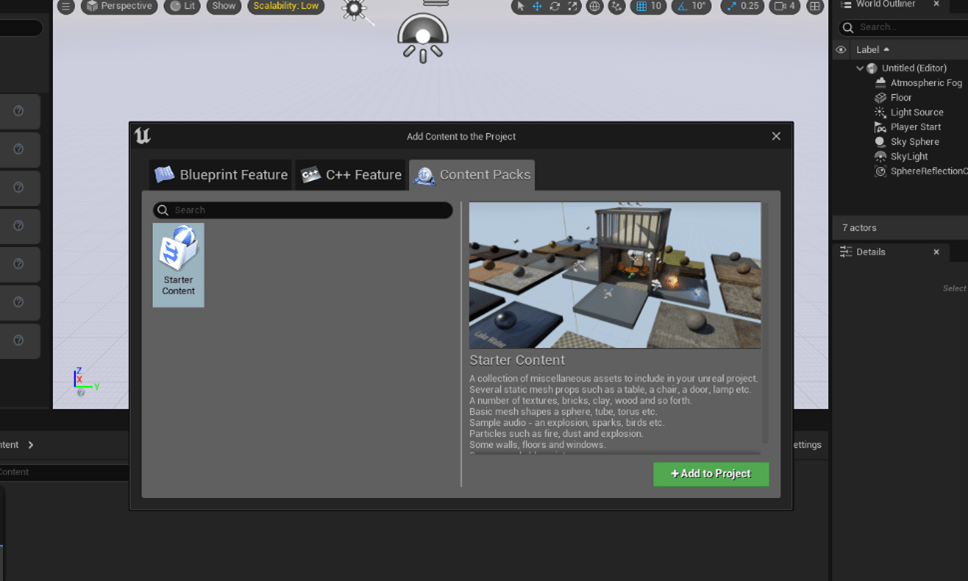
Content Browser From the Content Browser press the button “Add/Import” and select “Add feature or content pack” Content Packs Tab Then Go to “Content Packs”
Learn how to manage multiple Level Sequences across multiple Maps/Levels in unreal engine. This tutorial will cover the basics of scene management in unreal engine
This tutorial will cover creating a custom asset that will appear and be used in the unreal engine editor. There are two scenarios in which
If you’re saving an object in a TArray or TMap and it appears not to work, here are a few troubleshooting tips. Sometimes it will
Unreal Engine 5 presents a suite of advanced features designed to enhance game development, with the Movie Render Queue being a standout tool. Providing a
Introduction When working with Unreal Engine 5 (UE5) plugins, you may encounter the following error during project startup: “Plugin ‘X’ failed to load because module
Go from animating in Blender to animating in UE5 in 5 minutes. This tutorial compares the workflow similarities, naming differences, and available tools in unreal
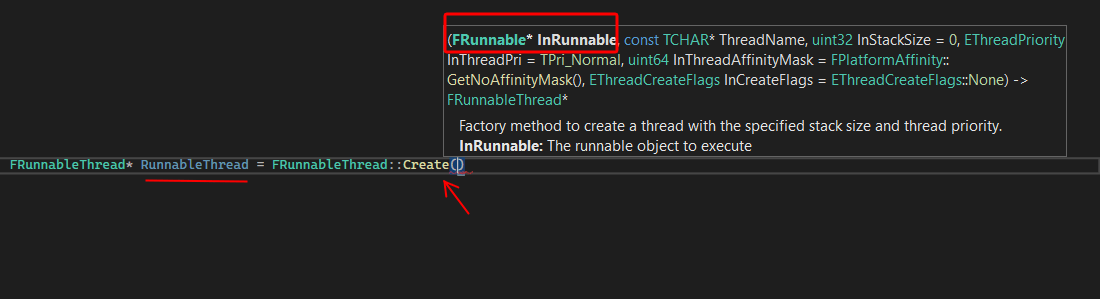
An Introductory tutorial to multithreading in Unreal Engine. We discuss how to create multithreaded games in unreal engine, the thread’s lifecycle, and how to share
A Quick tip on FSoftObjectPath in Unreal Engine: Sometimes you may need FSoftObjectPaths for “Assets” created at runtime and thus only available in memory and
This tutorial will cover setting custom thumbnails for your unreal engine custom asset type, asset colors, display names, and more. We assume you have created