
Documentation · Any Car Engine 1.0
Any Car Engine Documentation
How to hear the ten included engines, put one in your car, tune it into your own and add recordings if you have them. Sections 1 and 2 get a car running; the rest is there when you want to go further.
Get Any Car Engine →1 · Listen first
Audition an engine before it touches a car
- In the Content Browser, open Settings and tick Show Plugin Content, then go to Plugins > Any Car Engine > MetaSounds.
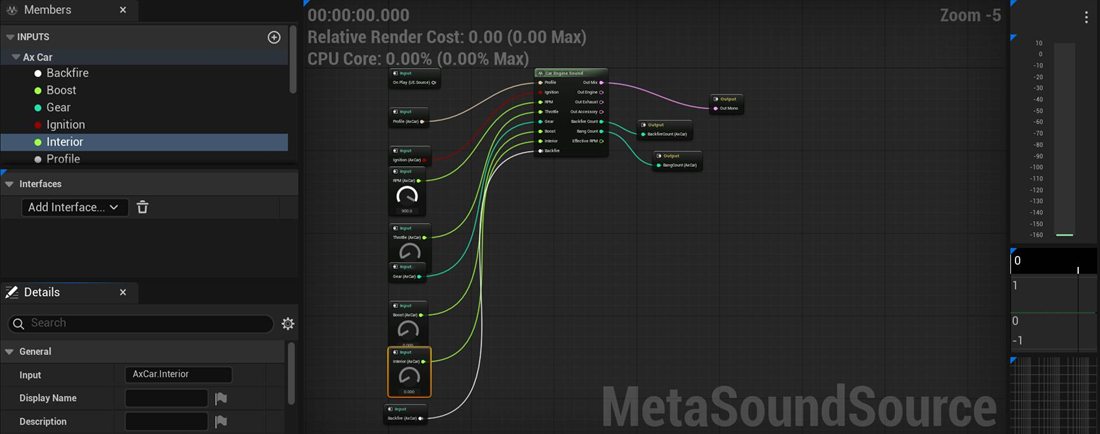
- Open MS_AxCarEngineSound and press Play in the MetaSound editor.
- Turn the AxCar.RPM and AxCar.Throttle knobs. Hold Throttle up with RPM at the top to hit the limiter, then drop Throttle to hear the overrun crackle.
- Under Members, select AxCar.Profile and change its default to another DA_AxCarEngine_ profile to compare engines.
Profiles or MetaSound missing? In the Output Log, switch the box to Cmd and run py "<plugin folder>/Scripts/CreateCarEngineContent.py". It recreates the ten profiles, the MetaSound and the attenuation, and leaves any that already exist alone.
2 · In your car
Add the component to a Chaos vehicle
- Open your vehicle Blueprint and click Add > Ax Car Engine Sound. Attach it to the mesh near the engine.
- In its Details, set Sound > Profile to one of the ten profiles.
- Under Input, open Chaos Vehicle Reference and pick the vehicle's movement component (VehicleMovementComp on a Wheeled Vehicle Pawn).
- Press Play and drive. RPM, throttle and gear are read every tick, with nothing to wire in Blueprint.
▾ Ax Car Engine Sound
Only know the vehicle at runtime? Call SetChaosVehicle once instead, for example on BeginPlay or when the player possesses the car.
3 · Chaos settings
Give the gearbox the same rev range as the engine
The sound follows the RPM that Chaos reports, so the vehicle movement component has to cover the profile's range. Set these on the movement component:
▾ Vehicle movement component
Car jumps from 1st to 4th, or never reaches the shift point? The vehicle template's OffroadCar_TorqueCurve is an External Curve shaped for 5000 RPM, and it overrides the inline keys: clear it or replace it. Keep Change Up RPM near the top of the range, because Chaos free-revs to about 40–50% of Max RPM during a gear change. When you raise Max RPM, raise Final Ratio and lower Max Torque by the same factor so the car keeps its speed and pull.
4 · Other vehicles
Feed the engine from your own vehicle code
Direct: send the values
Leave Chaos Vehicle Reference empty and call SetEngineInputs every tick with RPM, Throttle (0–1) and Gear. Gear 0 is neutral and negative gears are reverse. Only changed values are sent on, so calling it every frame costs almost nothing. Reading gears from Chaos yourself? Use GetCurrentGear, not GetTargetGear.
Simulated: send only the throttle
Set Input Mode to Simulated and call SetThrottle. The component reads the car's forward speed and runs a small automatic gearbox, with gear ratios, final drive, wheel radius, launch slip and shift points under Simulation. If the actor's velocity isn't the car's speed, pass it in with SetVehicleSpeed.
5 · Blueprint control
Start it, stop it, move the camera inside
▾ Ax Car Engine Sound functions
Whether the car spawns running is set by Input > Engine Inputs > Ignition. Pops on lift-off, upshifts, downshifts and at the limiter happen by themselves; TriggerBackfire is only for extra ones.
6 · Your own engine
Turn a preset into an engine of your own
- Duplicate the closest DA_AxCarEngine_ profile, or create one with Add > Miscellaneous > Data Asset > Car Engine Sound Profile.
- To jump to a different engine type, choose Preset > Preset To Apply and click Apply Preset. It replaces the synthesis settings, keeps your samples, and can be undone.
- Play in the editor and drive while you change settings. Every car using the profile updates at once, without restarting.
▾ Where a car's character lives
▾ Layout → what you hear
Three settings move the sound the most. Muffler Low Pass Hz goes from stock (1500) to sport (3500) to open pipes (9000). Drive adds saturation: 1 is clean, 3 and up is raspy. Keep Collector Reflection below about 0.6, or the exhaust starts sounding like a tube.
7 · Recordings
Blend in your own recordings
A profile can play recordings alongside the synth or instead of it. Import WAV files as Sound Waves and add them under the profile's Samples. They're baked into the asset as compact mono audio when you change them, or with Bake Samples; then save. The original Sound Waves stay editor-only and aren't packaged because of the profile.
Loop sets
Steady-RPM files, the format most engine libraries ship: every 500 RPM below 3000 and every 500–1000 above, 3–8 seconds each. Record on load and off load. For each set, choose Load, Perspective (Exterior or Interior) and Stem (Exhaust or Engine).
Ramps
One slow sweep from idle to the limiter, 10–30 seconds long. It's cut into grains of exactly one engine cycle and replayed at whatever RPM the car needs, so it sounds natural everywhere. Set the profile's Layout first, then check the RPM range in the Bake Report.
One-shots
Pops and Bangs (add several of each; one is picked at random), Blow Offs, Start and Stop. For a Start recording, set Starter > Start Sample Catch Time to the moment the engine catches.
A good mix for a recorded car: loops or ramps at 0 dB, Synth Exhaust at −12 to −18 dB for low-end punch, and synthesized pops and turbo on top. When the exhaust recordings should carry the sound alone, turn off Mix > Synthesize Exhaust.
Ramp RPM off by a factor of two in the Bake Report? The pitch tracker locked onto a harmonic. Narrow Min Rpm and Max Rpm, or set Rpm Mode to Linear and enter the start and end RPM yourself.
8 · Going further
Two emitters, your own MetaSound, crowded grids
Engine bay and tailpipe
Duplicate MS_AxCarEngineSound twice. In the front copy, add Out Engine and Out Accessory together into the output; in the rear copy, use Out Exhaust. Add both under Emitters, at the engine and at the tailpipe, with Report Backfires on for the rear one only.
Your own MetaSound
Any MetaSound Source works if its inputs use the AxCar names: Profile, Ignition, RPM, Throttle, Gear, Boost, Interior and Backfire. Missing ones are skipped. Put EQ, compression or reverb after the Car Engine Sound node. Building one by hand? Set the AxCar.RPM input's Range to 0–10000.
Lots of cars
Each engine peaks below 1.5% of a CPU core. For big AI fields, give background cars a lighter profile: turn off Synthesize Mechanical and the transmission whine, and use the MetaSound's virtualization settings.
Stuck on a car? Tell us which engine you're after and what you're hearing, and we'll help you get there.